Heatmap 2SFCA
The Heatmap 2SFCA (Two-Step Floating Catchment Area) tool produces a color-coded map visualizing spatial accessibility by combining supply capacity and demand in a single measure.
1. Explanation
The 2SFCA method measures spatial accessibility by considering both supply (capacity of facilities) and demand (population). Unlike simple supply-demand ratios per administrative unit, 2SFCA accounts for cross-boundary access: people can reach facilities in neighboring areas, and facilities serve populations beyond their own district. The result is a supply-to-demand ratio at the level of hexagonal grid cells. The tool works in two steps:
-
Step 1: Capacity Demand Ratios. For each facility location, compute how much capacity is available relative to the total demand (population) within its catchment areaGlossaryCatchment areaThe area that can be reached from a point within a given travel time or distance, following the real network rather than a straight line.Read more ↗. This produces a supply-to-demand ratio per facility.
-
Step 2: Cumulative Accessibility. For each grid cell, sum the capacity ratios of all reachable facilities. The result represents how well-served each location is.
You can configure the routing type, opportunity layers (with capacity fields), demand layer (with population field), travel time limits, and choose between three 2SFCA variants.
-
The Opportunity layers contain facility data with a capacity attribute (e.g., number of hospital beds, square meters of retail space, school seats).
-
The Demand layer contains population or user data (e.g., number of residents, potential customers) that represents the demand for the facilities.
-
The 2SFCA Type controls how distance weighting is applied:
- Standard 2SFCA uses binary catchments (in or out) - all locations within the travel time limit are weighted equally, regardless of their actual distance from facilities. This provides clear, straightforward supply-demand ratios.
- Enhanced 2SFCA (E2SFCA) weights by an impedance function in both calculation steps, creating realistic distance decay where closer facilities contribute more to accessibility than distant ones.
- Modified 2SFCA (M2SFCA) uses squared impedance weights in the second step, creating even stronger proximity bias. This variant heavily emphasizes nearby facilities while still considering distant options, making it ideal when travel convenience is paramount.
Key difference: Unlike the Gravity-based Heatmap, which measures general accessibility of destinations, the 2SFCA Heatmap explicitly models supply-demand balance - showing where capacity is sufficient or insufficient relative to the population that needs it.
Heatmap computation is available across over 30 European countries for Walk, Bicycle, Pedelec, and Car. For Public Transport, Germany, Switzerland, and the Haut-Rhin region of France are supported. If you need analyses beyond these regions, you can import your own routing network or contact us and we will do it for you.
2. Example use cases
-
Which neighborhoods are underserved by childcare facilities relative to the population that needs them?
-
Where should new childcare centers be built to best address gaps in supply-demand balance?
-
Are there areas where school capacity is insufficient given the number of school-aged children in the catchment?
3. How to use the tool?
Toolbox  .
. Accessibility Indicators menu, click on Heatmap 2SFCA.Routing & Configuration
Transport mode you would like to use for the heatmap.| Mode | Considers |
|---|---|
| Walk | All paths accessible by foot |
| Bicycle | All paths accessible by bicycle (taking into account surface and slope) |
| Pedelec | All paths accessible by pedelec (taking into account surface and slope) |
| Car | All paths accessible by car (taking into account speed limits and one-way restrictions) |
| Public Transport | All journeys possible by public transport (according to official GTFSGlossaryGTFSAn open standard for publishing public transport timetables, stops and routes as a set of text files, so any software can read the same data.Read more ↗ schedules), considering walking access and egress to and from stops |
Transport mode you picked in step 3:- Walk / Bicycle / Pedelec / Car
- Public Transport (PT)
In the Calculate by menu, choose either the Time (minutes) or Distance (metres) cost type.
Choose PT modes to analyze: Bus, Tram, Rail, Subway, Ferry, Cable Car, Gondola, and/or Funicular. Then, select the Day and Arrival time for the analysis. The best public transport journeys that reach the opportunities at or before this time will be considered.
2SFCA Type you would like to use.- Standard 2SFCA
- Enhanced 2SFCA (E2SFCA)
- Modified 2SFCA (M2SFCA)
The standard 2SFCA method uses binary catchments: a facility either serves a population location (if within the travel time limit) or it does not. There is no distance weighting: all locations within the catchment are treated equally.
This is the simplest variant and works well when you want a straightforward supply-demand ratio.
The Enhanced 2SFCA method adds distance decay weighting using an impedance function. In both steps, interactions are weighted by how far apart the facility and population are, so closer locations receive higher weight. This produces more realistic results, reflecting that people are more likely to use nearby facilities.
Requires selecting an impedance function and sensitivity value.
The Modified 2SFCA method applies squared impedance weights, creating an even stronger distance decay effect. While Enhanced 2SFCA considers proximity with a relative weighting approach, Modified 2SFCA also takes into account the absolute distance impact by squaring the impedance weights.
Requires selecting an impedance function and sensitivity value.
Impedance Function for distance weighting.- Gaussian
- Linear
- Exponential
- Power
- Cumulative
Calculates distance weights using a Gaussian (bell-shaped) curve. Accessibility decreases slowly for short travel times and drops off rapidly beyond a certain threshold. This is the most commonly used impedance function. For details, see Technical details.
Maintains a direct linear relationship between travel time and weight. Weight decreases uniformly from 1 (at origin) to 0 (at maximum travel time). For details, see Technical details.
Calculates weights using an exponential decay curve, controlled by the sensitivity parameter. Higher sensitivity values produce a slower decay. For details, see Technical details.
Calculates weights using a power function. The sensitivity parameter controls the exponent, determining how quickly weights decrease with travel time. For details, see Technical details.
Applies a full weight of 1 to every facility within the travel time limit and 0 beyond it, with no distance decay. Unlike the other functions, it does not use the sensitivity parameter, so all reachable facilities count equally. For details, see Technical details.
Advanced options
Optionally, enable Advanced options to configure additional settings for routing and heatmap generation.
Reference area - a polygon layer that represents your study area. When set, the heatmap extends to cover all H3 cells within that polygon, with inaccessible cells assigned a value of NULL to expose coverage gapsGlossaryService gapsAreas or times where people cannot reasonably reach what they need, because the service is absent, too far, or runs too rarely.Read more ↗ and underserved areas.Demand
Demand Layer from the drop-down menu. This layer should contain population or user data (e.g., census data with resident counts).Demand Field: a numeric field from your demand layer representing the number of potential users (e.g., population, number of households).Opportunities
Input Layer from the drop-down menu. This layer should contain facility locations (e.g., hospitals, schools, shops).Travel Time Limit defining the maximum catchment area in minutes.Choose a Potential Type to define how each facility's capacity is determined:
- Constant: all facilities have the same capacity. Enter a numeric value (default: 1.0).
- Field: use a numeric field from the Input Layer as the capacity (e.g., number of beds, seats, or square meters).
Sensitivity value to control how quickly the impedance function decays with distance.+ Add Opportunity. Multiple facility types can be combined into a single analysis.Advanced Options and select a Reference Area: a polygon layer that defines the full study area. When set, the heatmap extends to cover all H3 cells within that polygon, with cells outside the computed reach shown as NULL to expose coverage gaps and underserved areas.Result Layer
Result layer name for the output heatmap layer.Run to start the calculation.Results
Once the calculation is complete, a result layer will be added to the map. This Heatmap 2SFCA layer contains a color-coded hexagonal grid where each cell shows the computed accessibility value, the supply-to-demand ratio at that location.
- Higher values indicate better accessibility: more supply capacity is available relative to the local demand.
- Lower values indicate underserved areas: the population exceeds the available capacity of reachable facilities.
Clicking on any hexagonal cell reveals its computed accessibility value.
Want to create visually compelling maps that tell a clear story? Learn how to customize colors, legends, and styling in our Styling section.
Example of calculation
The following example illustrates how the 2SFCA method works for each step.
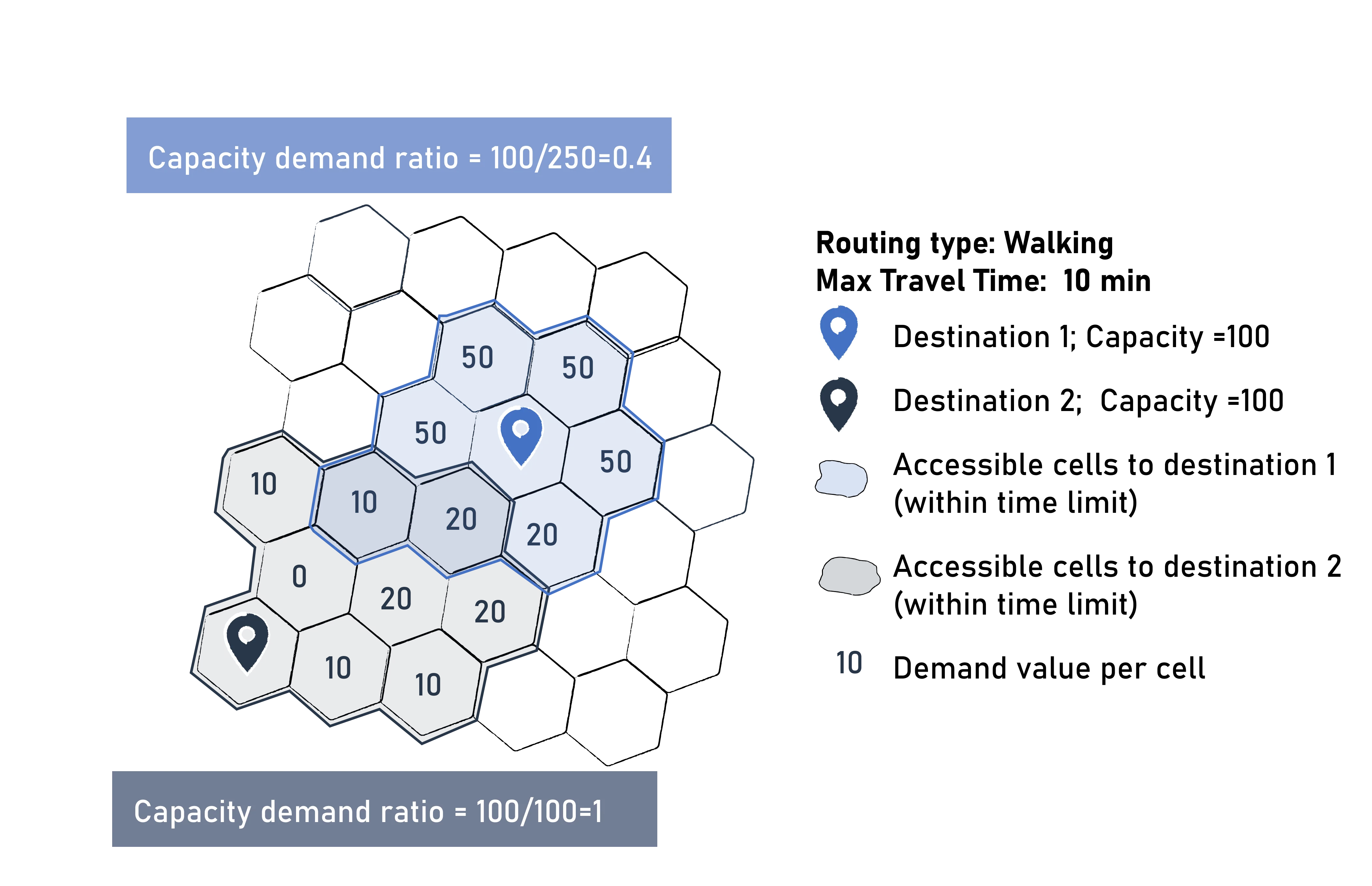
- Step 1 computes a capacity ratio for each destination. A destination with 100 beds serving 100 people has a ratio of 1.
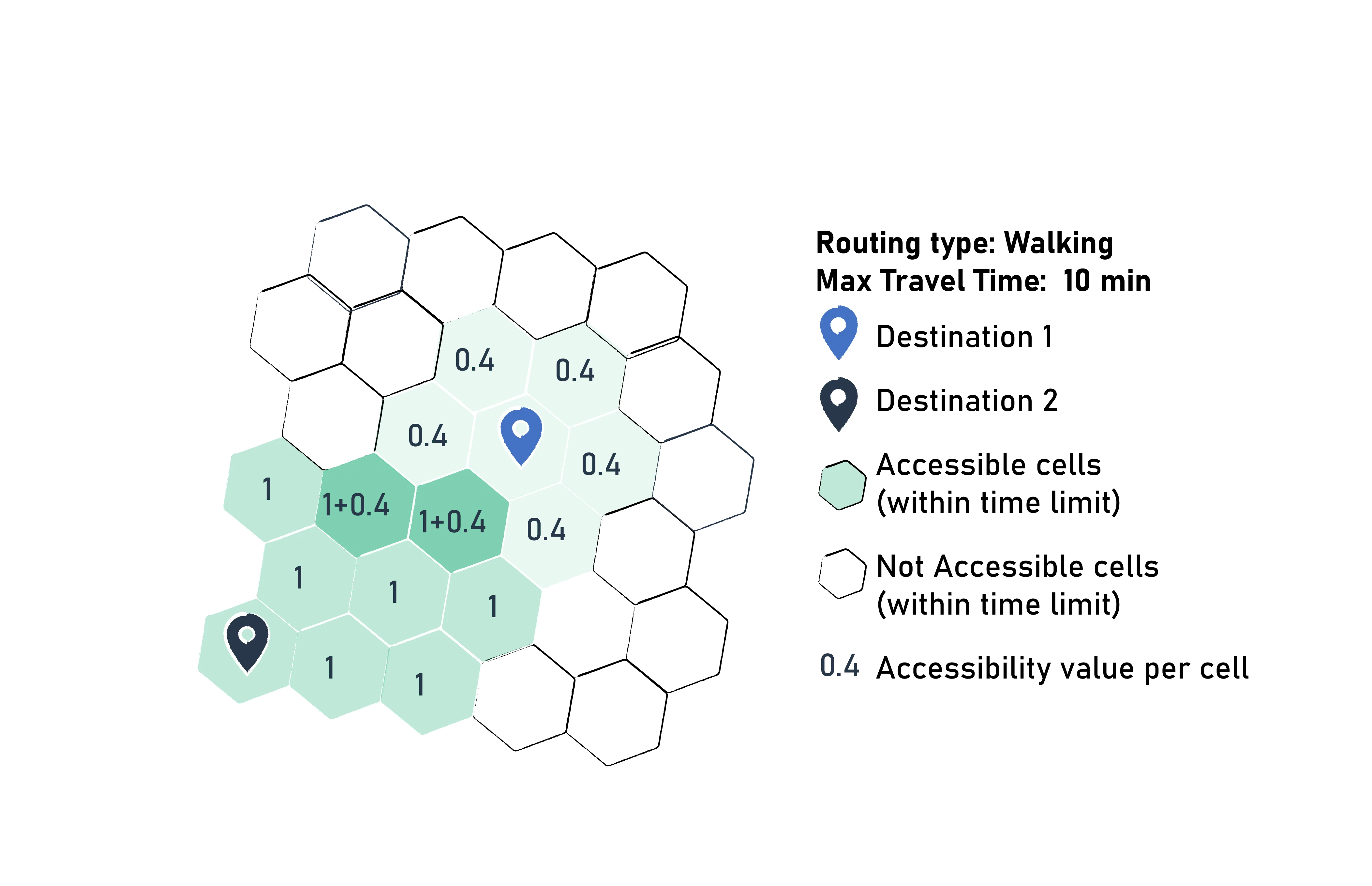
- Step 2 sums up the ratios of all destinations reachable from each cell. A cell that can reach two destinations (ratios 1 and 0.4) gets an accessibility of 1.4.
4. Technical details
Cell costs
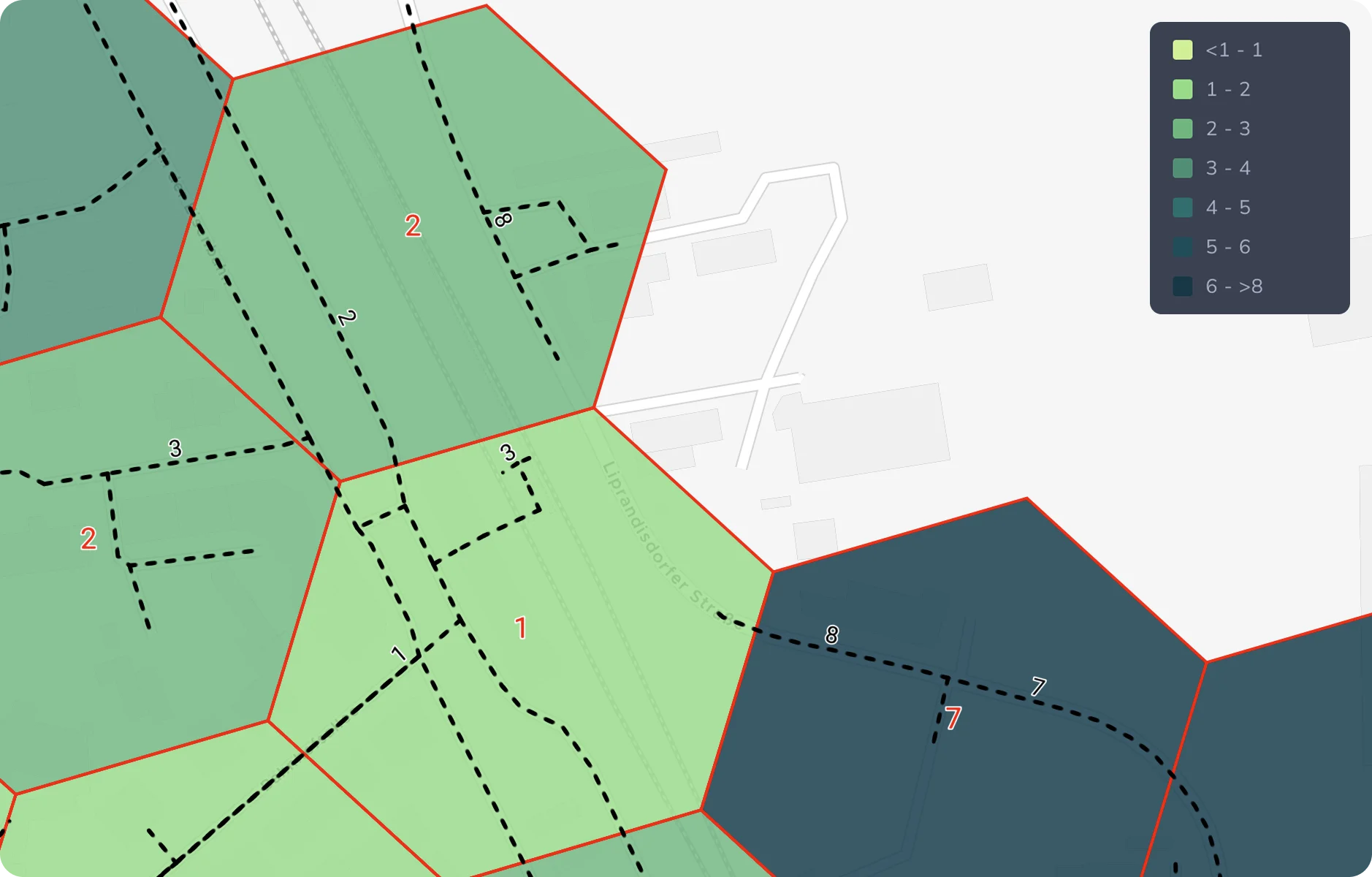
When multiple edges (streets) of the road network intersect a hexagonal cell, the cell's cost is calculated as the minimum of all edge costs within that cell. For the 2SFCA heatmap, this cost value (represented by tkj) is then used according to the formula described in the following section to determine the accessibility of each cell.
Calculation
The 2SFCA method computes accessibility in two steps:
Step 1: Capacity Demand Ratio
For each facility location j, compute the ratio of its capacity to the total demand within its catchment:
Where:
- Rj = capacity demand ratio of facility j
- Sj = capacity (supply) of facility j
- Dk = demand (population) at location k
- tkj = travel time from location k to facility j
- t0 = travel time limit (maximum catchment)
- f(tkj) = impedance function (distance weight)
Step 2: Cumulative Accessibility
For each grid cell i, sum the capacity demand ratios of all reachable facilities:
Where:
- Ai = accessibility at location i
- Rj = capacity demand ratio of facility j (from Step 1)
- f(tij) = impedance function weight
2SFCA Variants
The three variants differ in how the impedance function f(t) is applied:
| Variant | Step 1 | Step 2 |
|---|---|---|
| Standard 2SFCA | f(t) = 1 (binary) | f(t) = 1 (binary) |
| E2SFCA | f(t) = w(t) | f(t) = w(t) |
| M2SFCA | f(t) = w(t) | f(t) = w(t)2 |
Where w(t) is the selected impedance function (Gaussian, Linear, Exponential, Power, or Cumulative).
Comparison of variants
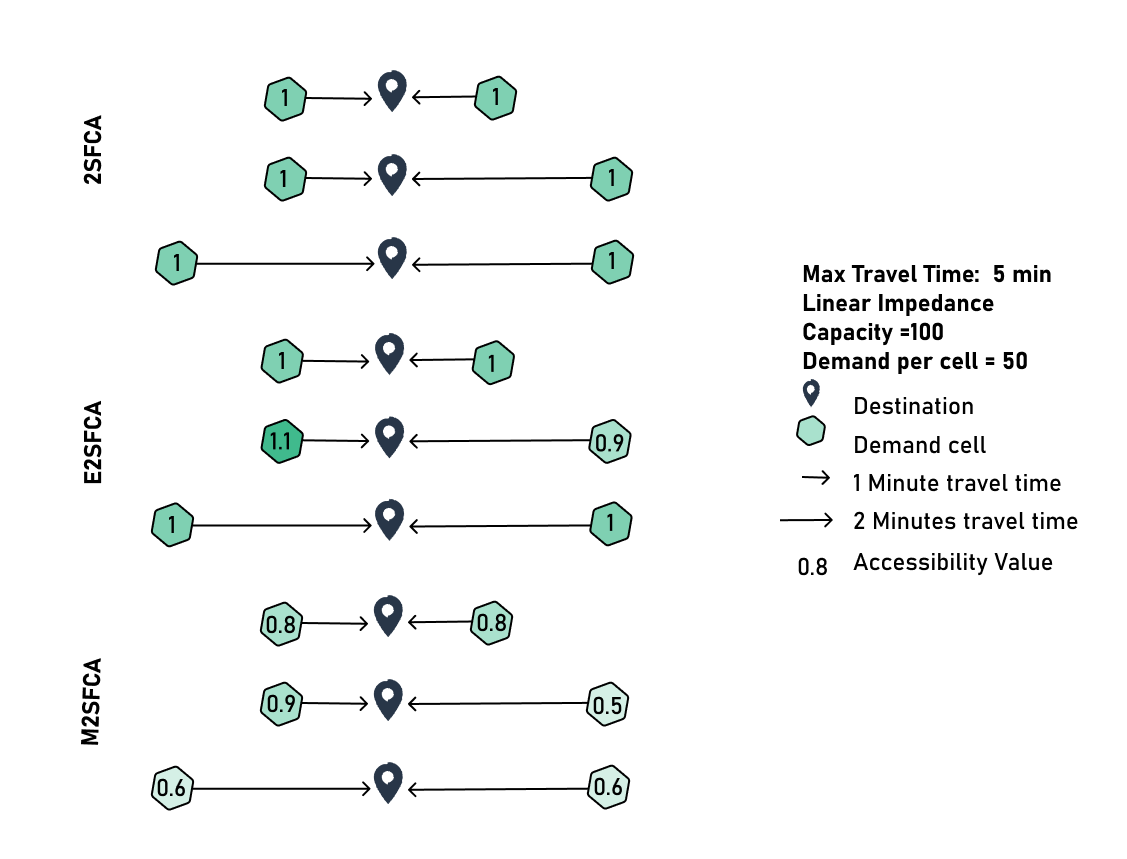
The different calculation approaches change how distance is perceived and measured, as illustrated in the examples below. Each scenario shows a facility with 100 units of capacity (indicated by the central location marker) serving grid cells with 50 units of demand each. We assume a maximum travel time of 5 minutes, where small arrows represent 1-minute travel time and large arrows represent 2-minute travel time. A linear impedance function ($f(d) = 1 - d/5$) is used for Enhanced and Modified variants.
-
The Standard 2SFCA treats all locations within the catchment equally, regardless of distance. Whether a population cell is 1 minute or 2 minutes away from the facility, it receives the same value in all configurations of 1.
-
The Enhanced 2SFCA introduces distance decay weighting producing differenciation of the accessibility based on the distance, with a higher accessibility (value of 1.1) for closer cells. However, cells equidistant from facilities receive identical accessibility regardless of absolute distance (e.g., two cells both 1-minute away or in 2-minute away all get 1).
-
The Modified 2SFCA applies squared impedance weights in Step 2, producing stronger distance penalties with values like 0.9 and 0.5 (compared to E2SFCA's 1.1 and 0.9 for similar positions). It takes into account absolute distance in opposition to E2SFCA. For example, two cells both 2 minutes away get lower accessibility (0.6) than two cells both 1 minute away (0.8).
Choosing the appropriate variant depends on your specific analysis objectives and how sensitive your target population is to travel distance.
GOAT uses the following impedance functions for the Enhanced and Modified 2SFCA variants:
Modified Gaussian, (Kwan,1998):
As studies have shown, the relationship between travel time and accessibility is often non-linear. This means that people may be willing to travel a short distance to reach an amenity, but as the distance increases, their willingness to travel rapidly decreases (often disproportionately).
Leveraging the sensitivity you define, the Gaussian function allows you to model this aspect of real-world behaviour more accurately.
Cumulative Opportunities Linear, (Kwan,1998):
Negative Exponential, (Kwan,1998):
Inverse Power, (Kwan,1998) (power in GOAT):
Cumulative Opportunities (cumulative in GOAT):
The cumulative function applies no distance decay and does not use the sensitivity parameter: every facility within the travel time limit t̄ contributes with full weight. Note that with cumulative weights, E2SFCA and M2SFCA reduce to counting reachable facilities equally rather than distance-differentiating them.
Classification
In order to classify the accessibility levels that were computed for each grid cell, a classification based on quantilesGlossaryQuantile classificationA way to group data into classes for a map so that each class holds the same number of features, whatever the range of values inside it.Read more ↗ is used by default. However, various other classification methods may be used instead. Read more in the Data Classification Methods section of the Attribute-based Styling page.
Visualization
Heatmaps in GOAT utilize Uber's H3 grid-basedGlossaryH3 gridA system that divides the earth's surface into hexagonal cells at several resolutions, used to compute and display values over an area.Read more ↗ solution for efficient computation and easy-to-understand visualization. Behind the scenes, accessibility is computed on-the-fly by GOAT's own routing engine. For each routing type, the engine routes outward from the opportunities to discover the reachable H3 cells and their travel costs, then aggregates these into a per-cell accessibility score. Public transport uses the RAPTOR-based engine, while the active mobilityGlossaryActive mobilityGetting around under your own power, mainly walking and cycling, including pedelecs, wheelchairs and scooters.Read more ↗ and car modes use GOAT's Dijkstra implementation.
The resolution and dimensions of the hexagonal grid used depend on the selected routing type:
| Mode | Resolution | Average hexagon area | Average hexagon edge length |
|---|---|---|---|
| Walk | 10 | 11,285.6 m² | 65.9 m |
| Bicycle | 9 | 78,999.4 m² | 174.4 m |
| Pedelec | 9 | 78,999.4 m² | 174.4 m |
| Car | 8 | 552,995.7 m² | 461.4 m |
| Public Transport | 9 | 78,999.4 m² | 174.4 m |
For further insights into the Routing algorithm, visit Routing. In addition, you can check this Publication.
5. References
Jörg, R.; Lenz, N.; Wetz, S.; Widmer, M. (2019): Ein Modell zur Analyse der Versorgungsdichte: Herleitung eines Index zur räumlichen Zugänglichkeit mithilfe von GIS und Fallstudie zur ambulanten Grundversorgung in der Schweiz (Obsan Bericht, Nr. 01/2019). Neuchâtel: Schweizerisches Gesundheitsobservatorium.
https://www.obsan.admin.ch/sites/default/files/obsan_01_2019_bericht_0.pdf