ÖV-Güteklassen
The ÖV-Güteklassen indicator classifies the quality of public transport services in a given area, helping planners and stakeholders quickly identify well-served and underserved locationsGlossaryDeficit areaAn area formally identified as falling short on a defined standard, such as green space or cooling, which makes it a place planning can act on.Read more ↗.
1. Explanation
ÖV-Güteklassen (Public Transport Quality Classes) provide a standardized way to evaluate and visualize the attractiveness of public transport services. The classes range from A (very good) to F (very poor), based on service frequency, station type, and spatial coverage.
The ÖV-Güteklassen indicator is decisive and can be used to highlight deficits in the public transport offer and to identify well-serviced locations as attractive areas for development.
ÖV-Güteklassen computation is available for areas where public transport GTFS dataGlossaryGTFSAn open standard for publishing public transport timetables, stops and routes as a set of text files, so any software can read the same data.Read more ↗ is integrated into GOAT. Currently supported regions include Germany, Switzerland, and the Haut-Rhin region of France. If you need analyses beyond these regions, you can import your own public transport network or contact us and we will do it for you.
2. Example use cases
- How good is public transport supply in different parts of the city?
- How many people are underserved by public transport? Where is the need for further supply?
- How does the quality of public transport services differ at different times of the week and day?
3. How to use the indicator?
Toolbox  .
. Accessibility Indicators, select ÖV-Güteklassen to open the settings menu.Calculation Time
Day, Start Time, and End Time for your analysis.Configuration
Catchment area type: Buffer.Buffers represent areas around public transport stations measured "as the crow flies".
Reference Area Layer: a polygon layer defining the study area boundary.Station configuration to change how stations are classified. The dialog starts from a ready-made profile and lets you adjust the frequency thresholds, the transport mode groups, the station categories and the quality class each buffer distance gives. Click Apply to keep your changes. See Station configuration for what each setting does.Result Layer
Result layer name for the output ÖV-Güteklassen layer.Station layer name for the output stations layer.Run to start the calculation.Results
After calculation, two layers are added to the map:
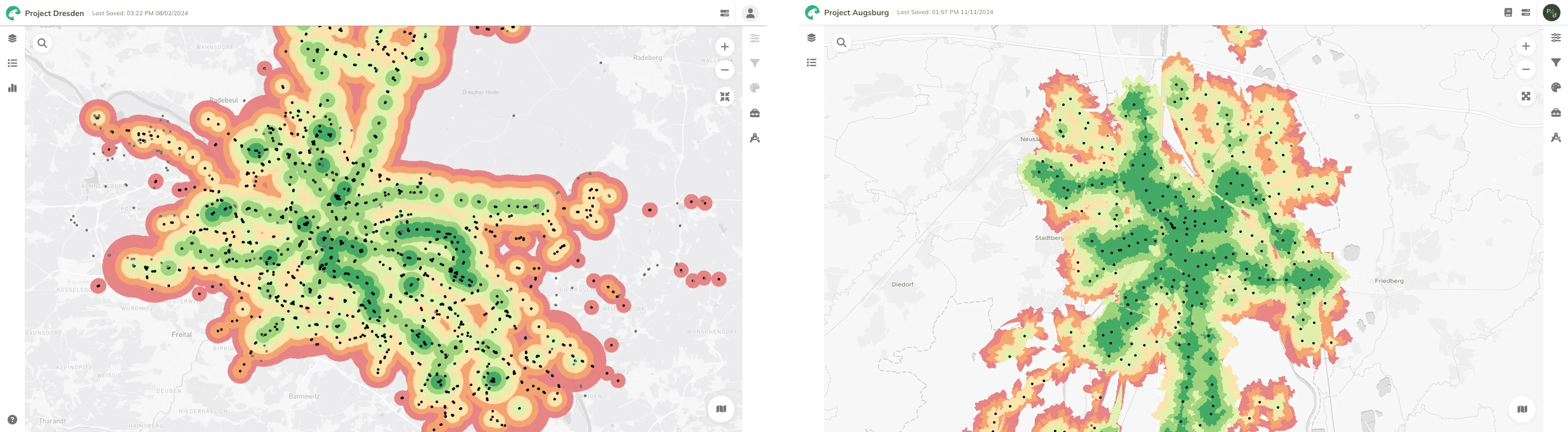
- ÖV-Güteklassen: Shows the quality class for each area.
- ÖV-Güteklassen Stations: Shows all stations used in the calculation (grey points = too low frequency, don't contribute to any PT Quality Class).
If you click on a ÖV-Güteklassen result your will see the further details, such as Public Transport Class and Public Transport Class Number. Both represent the quality of public transport in that area (see calculation for more details).
If you click on any station, you can see details such as the stop name, average frequency, and station category.
4. Technical details
Scientific Background
The approach of Public Transport Quality Classes (German: ÖV-Güteklassen) is methodologically superior compared to common catchment areasGlossaryCatchment areaThe area that can be reached from a point within a given travel time or distance, following the real network rather than a straight line.Read more ↗. In 2011, the Swiss Federal Office for Spatial Development (ARE) started to use this indicator to include the attractiveness of public transport services in the assessment of quality development; since then, it has been considered an important instrument in formal planning processes in Switzerland. Later on, the Swiss model served as an inspiration for its application in Austria (e.g. Voralberg) and Germany (e.g. by KCW and Agora Verkehrswende).
The institutionalization of the indicator in German-speaking countries, as well as the comprehensible and at the same time differentiated calculation methodology, are important advantages of the ÖV-Güteklassen.
Calculation
In the Swiss version of the indicator, the calculation of the quality classes is usually carried out for departures on weekdays between 6 AM and 8 PM. For the use in GOAT, the calculation period was made more flexible so that the indicator can be calculated for any day of the week and time of day.
The calculations are carried out based on GTFS data (see Network Datasets): First, the number of departures per public transport mode (train, metro, tram, and bus) is dynamically calculated for each station. The sum of the departures is divided by two to calculate the frequency, to eliminate the outward and return directions. In the next step, the average frequency for the selected time interval is calculated. The higher-value service is selected as the station type in the case of service by several means of transport. For example, in the case of buses and trains, this is the train. With the help of the table below, as well as the station type and the frequency, the station category can now be determined.
Calculation steps
- Departures per station: Calculate the number of departures per mode (train, metro, tram, bus) for each station using GTFS data (see Network Datasets).
- Frequency: The sum of the departures is divided by two to eliminate the outward and return directions.
- Station type: For each station, determine the highest-ranking mode of transport served (e.g., if both bus and train are available, the station is classified as a train station).
- Category assignment: Use the station type and frequency to determine the category (see table below).
- Catchment areas: Create buffers for each station category.
- Merge areas: Overlapping areas are merged, with the higher-quality class taking precedence.
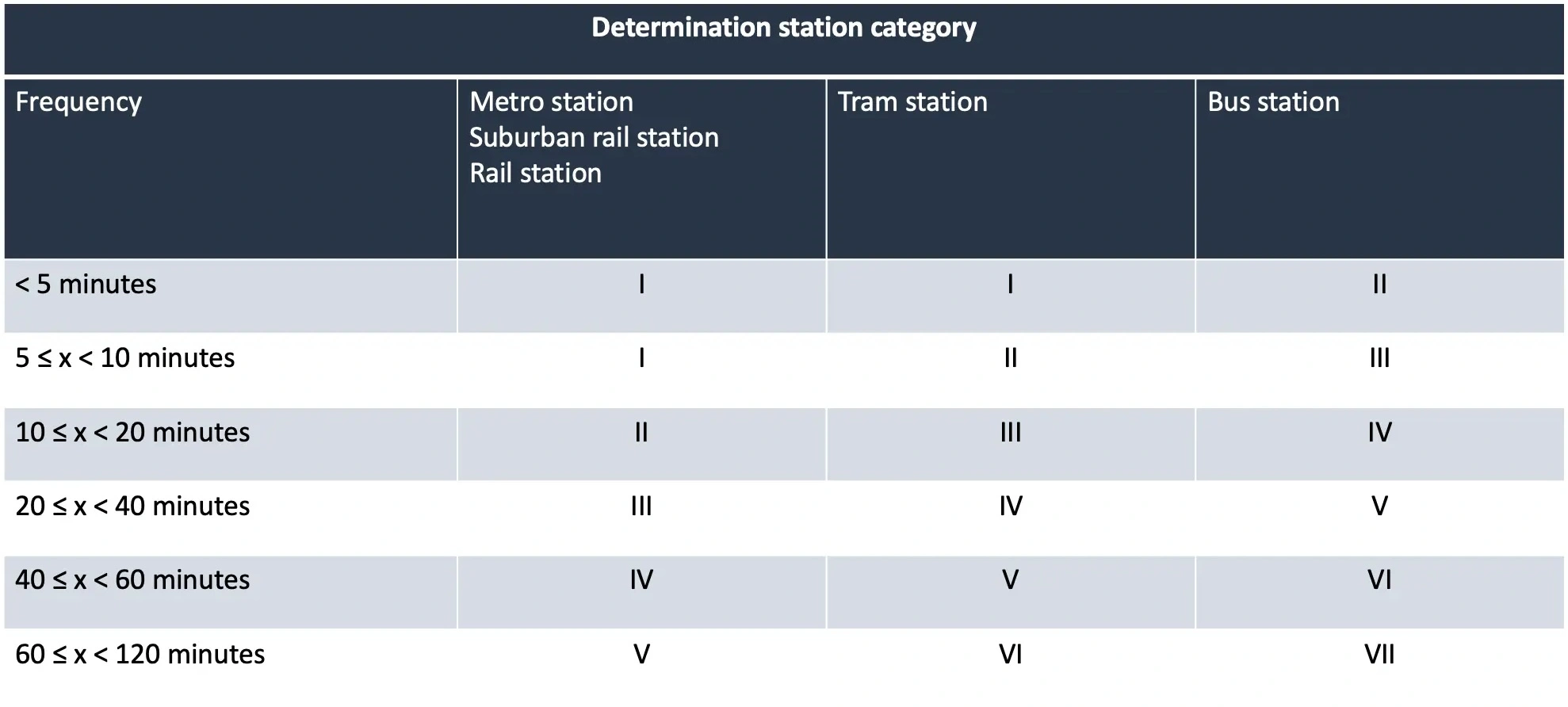
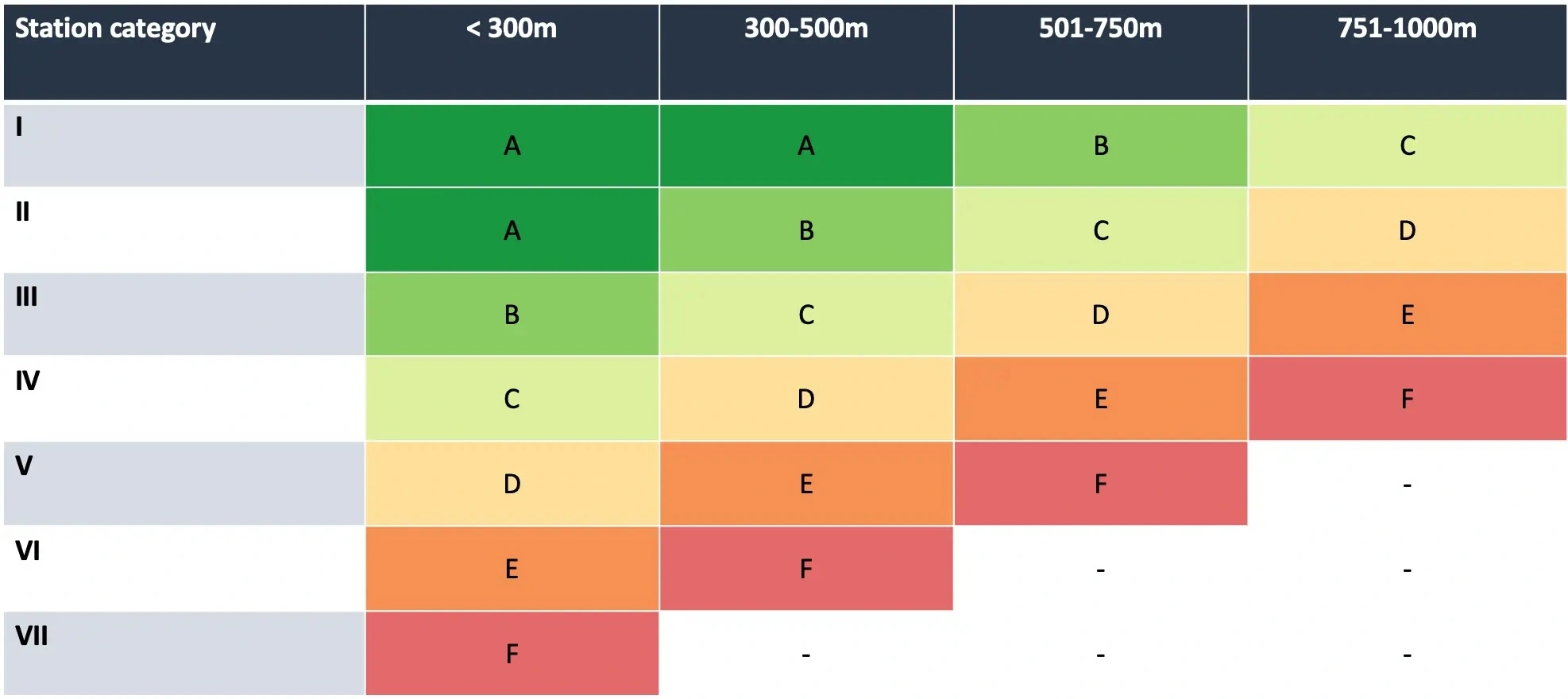
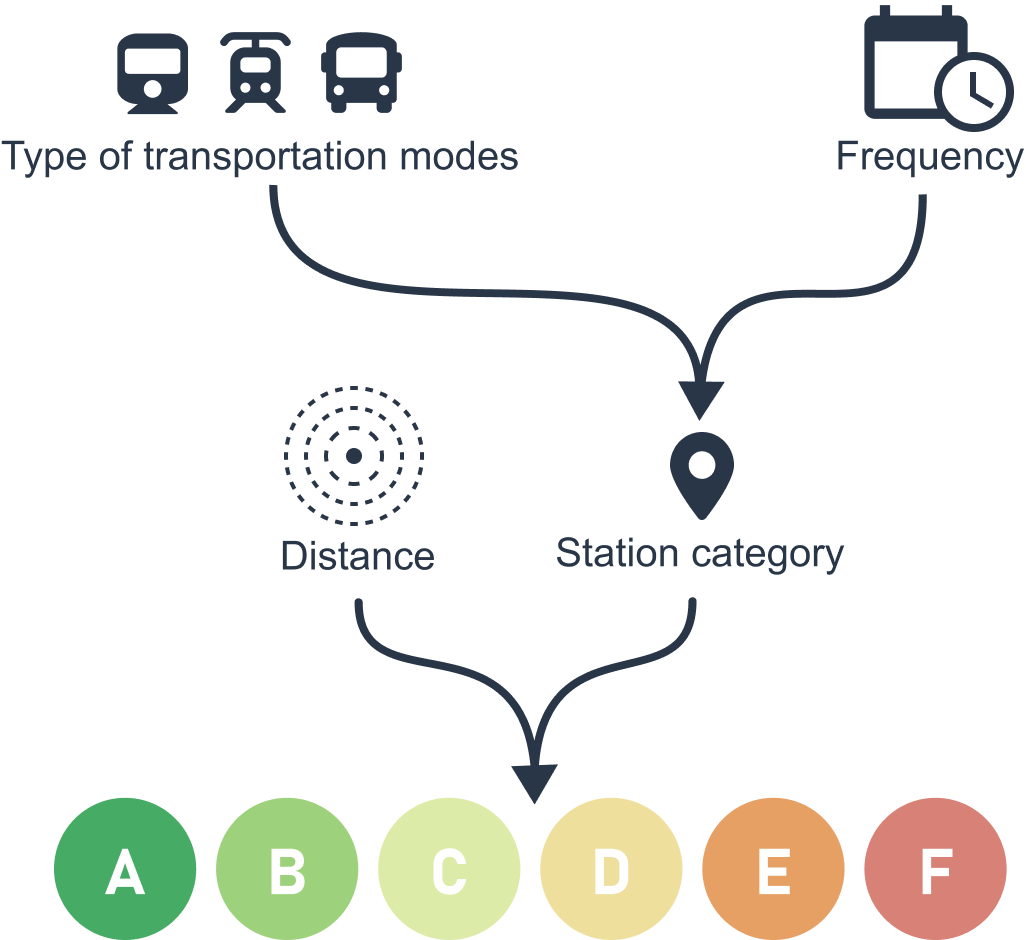
Station configuration
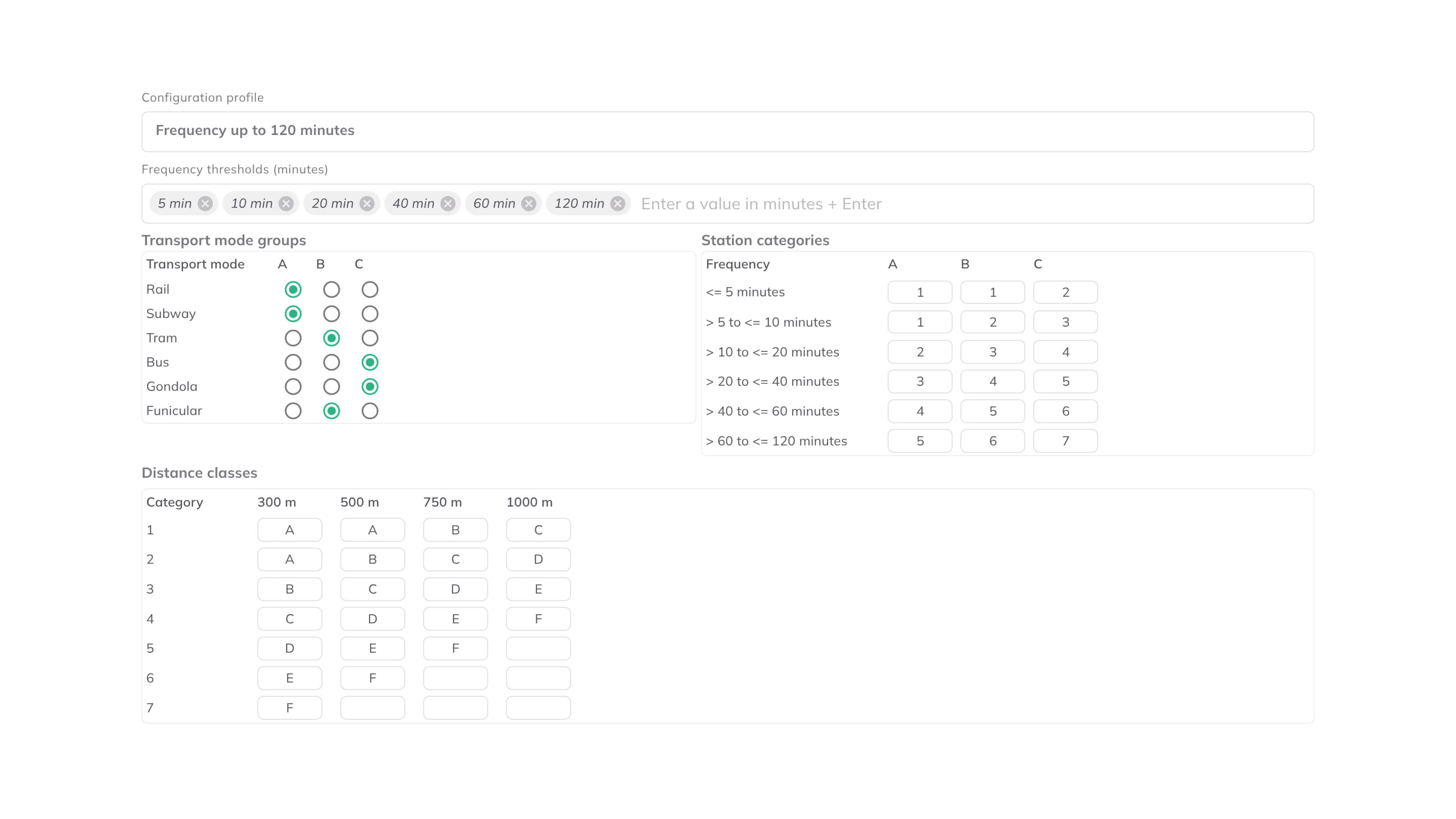
By default, GOAT classifies stations with the standard scheme from the Swiss ARE model described above. If you need a different scheme, open Station configuration in the tool and adjust it. The dialog has five parts, and they work together in this order: a station's average service interval and its transport mode decide its category, and the category and buffer distance then decide the quality class that each catchment ring receives.
-
Configuration profile: a ready-made starting point. Three profiles are available,Frequency up to 60 minutes,Frequency up to 120 minutes(the default) andFrequency up to 210 minutes. They differ in how many frequency tiers they cover, and with that in their station categories and how far each category reaches;Frequency up to 210 minutesadds a1250m ring and a quality class G. When your settings no longer match one of the profiles, the selector showsCustom. -
Frequency thresholds (minutes): the service intervals used to sort stations, entered as minute values (default5, 10, 20, 40, 60, 120). Each value is the upper bound of an interval, so the tiers read as "up to 5 minutes", "over 5 up to 10 minutes", and so on. A station is placed in a tier by its average frequency: the more often it is served, the higher the tier. A station whose average interval is longer than the last threshold gets no category and no catchment, so with a lower last threshold, such as inFrequency up to 60 minutes, rarely served stops drop out of the result. -
Transport mode groups: each transport mode belongs to one of three groups,A,BorC. By defaultRailandSubwayare in group A,TramandFunicularin group B, andBusandGondolain group C. Ferries and some cable cars have no row of their own: depending on how the timetable data codes them, they are either in group C or left out of the calculation. Group A ranks highest. When a station is served by several modes, the highest group it has decides its type. -
Station categories: a table with one row per frequency tier and one column per mode group (A, B, C). Each cell holds the category given to a station in that tier and group. This is the core lookup that turns frequency and mode into a single station category. -
Distance classes: a table with one row per station category and one column per buffer distance in metres (300,500,750and1000m, plus1250m inFrequency up to 210 minutes). The distances come with the profile and can't be changed; you set the class in each cell, as a letter. An empty cell means no ring at that distance. Each cell holds the quality class that a buffer ring of that size around a station of that category receives. This is what sets how far each category reaches. Where rings from different stations overlap, the better class wins.
Visualization
The created buffer catchment areas are visualized around the stations in the corresponding colors to highlight the quality class (A-F, and G with Frequency up to 210 minutes).
5. Further readings
Sample projects where ÖV-Güteklassen was used:
- Germany-Wide Assessment of Public Transport Accessibility Through Public Transport Quality Classes white paper
- Accessibility analyses for the "Mobility Guarantee" and "Public Transport Atlas" projects
- Calculation of public transport quality classes in Austria
- Calculation of public transport quality classes in Germany
6. References
-
Bundesamt für Raumentwicklung ARE, 2022. ÖV-Güteklassen Berechnungsmethodik ARE (Grundlagenbericht).
-
Hiess, H., 2017. Entwicklung eines Umsetzungskonzeptes für österreichweite ÖV-Güteklassen.
-
metron, 2017. Bedienungsqualität und Erschließungsgüte im Öffentlichen Verkehr.
-
Shkurti, Majk, 2022. "Spatio-temporal public transport accessibility analysis and benchmarking in an interactive WebGIS". url: https://www.researchgate.net/publication/365790691_Spatio-temporal_public_transport_accessibility_analysis_and_benchmarking_in_an_interactive_WebGIS