Start from a template
Templates let you begin with something already set up instead of a blank canvas. GOAT offers three kinds:
- Project templates — open a prepared project with styled layers, finished analyses, and a dashboard. A good starting point when you want a complete example to explore or adapt.
- Workflow templates — a ready-made analysis workflow where only your own data is missing. You supply the input layers and run it.
- Layout templates — print-ready page layouts, with the page size given in millimetres.
This page focuses on project templates. For the other two, see Save a workflow as a template and the Layouts page.
Browsing templates
On the Home page, the Start from a template row shows the available templates. You can:
- Filter by kind —
All templates,Project,Workflow, orLayout. - Filter by source — who the template came from:
Everyone,GOAT,Mine,Team, orOrganization. - Click
All templatesto open the full template browser, where you can search templates and preview one before using it.
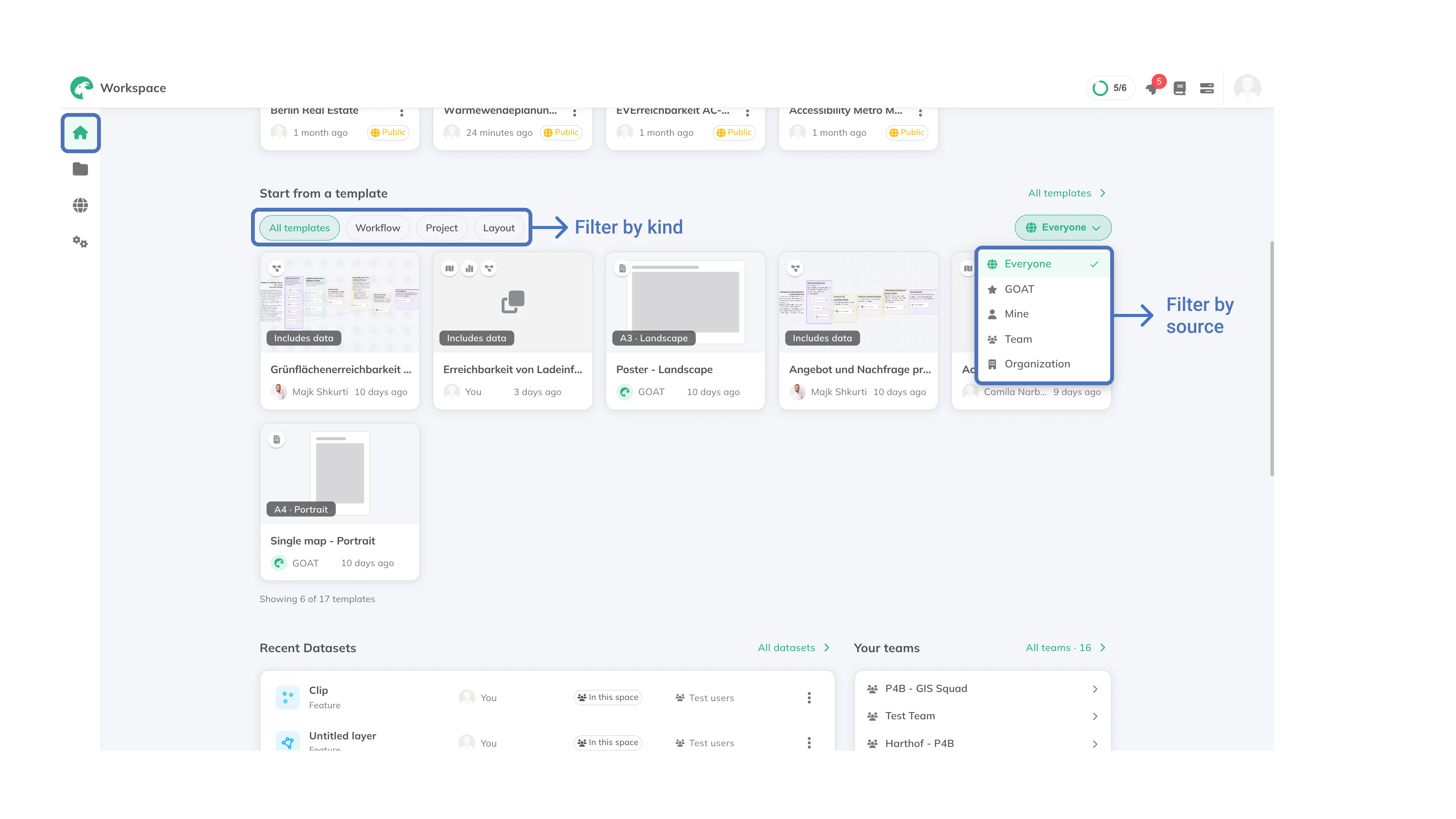
Templates from GOAT are also available under the Templates tab of the Catalog.
Using a project template
1
On the
Home page, find a project template in the Start from a template row, or open All templates and filter by Project.2
Select a template to preview what it contains.
3
Click
Use template. GOAT creates a new project from the template, with its layers, analyses and dashboard already in place, and opens it.info
A project template opens as a new project you own. You can change it freely without affecting the template.