Catalog
The Data Catalog is your gateway to exploring Plan4Better's comprehensive collection of high-quality geospatial datasetsGlossaryGeospatial dataAny data that includes a location, whether as coordinates, an address or an area, so it can be placed on a map and analysed spatially.Read more ↗. This curated library provides reliable, ready-to-use data from official open-data providers and other trusted sources, enabling you to immediately start analysis and visualization within your GOAT projects. From the Catalog you can:
- Explore our dataset collection spanning multiple thematic areas and geographic regions
- Search and filter through it by keyword, location, category, publisher, licence and more
- Save the datasets you use often and add them straight to a project
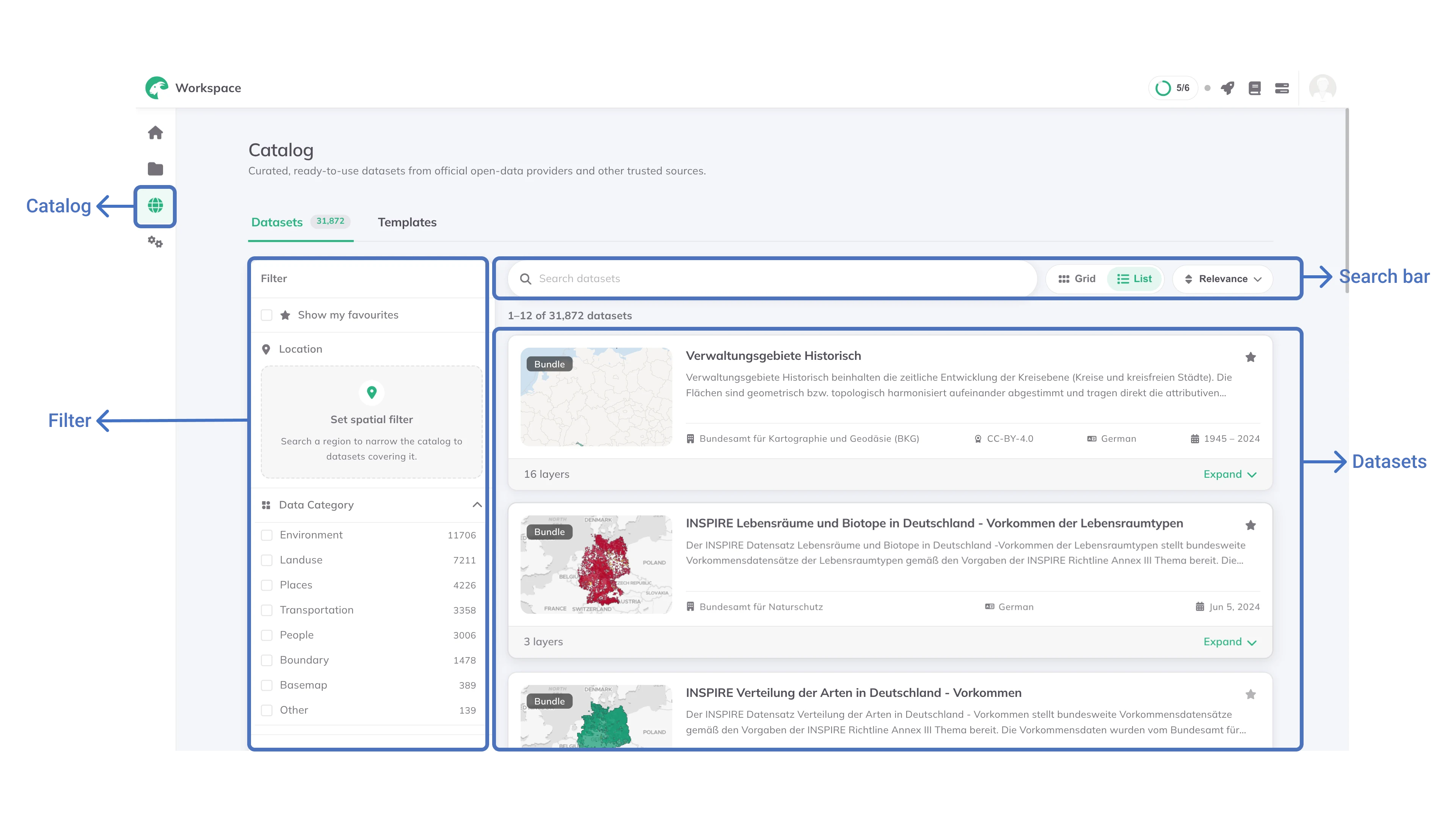
Finding a dataset
Open the Catalog from the sidebar, or reach it from + Add layer inside a project. The page lists every dataset in the catalog. Search, filters and sorting all narrow that list, and copying the page link shares the result. Whoever opens it sees the same datasets you did.
Search
Type into the search box to match a dataset's title, description and keywords.
Matching is on whole or partial words and ignores capitals, so grünfläche finds Grünflächen. It does not work the other way round: a longer word than the one in the data matches nothing, so prefer the shorter stem when a search comes back empty.
Filters
The sidebar narrows the list, in this order:
- Show my favourites: only the datasets you have starred
- Location:
Set spatial filterrestricts the catalog to datasets covering an area, described in one of three ways - Data Category: the dataset's theme, such as transportation, environment, people, land use or hazards. The sidebar shows every category the catalog currently holds
- Data type: whether the dataset is a feature layer, a table, a raster or a bundle
- Geometry: the kind of shape its features have
- Publisher: who distributes the dataset
- License: the terms it is published under
- Language: the language of its metadata
- Period: a
FromandTodate, to find data covering a particular time
Each section lists the values the catalog actually holds, commonest first, with a count beside each. The counts update as you narrow, and a value that no longer matches anything stays in the list, greyed out with a count of 0. Selected filters appear as chips above the results, so you can remove one without reopening the sidebar, and Clear in the sidebar header removes them all.
Filtering by location
Set spatial filter narrows the catalog to datasets covering an area you care about. There are three ways to describe it:
- Region: search for a country, state or district by name. Several can be combined, and a dataset covering any of them matches.
- Point + buffer: click the map to place a point, then set a radius around it
- Polygon: click the map to draw the corners of an area
Results are ranked by how much of each dataset falls inside your area, so the datasets that cover it best come first.
Regions come from Eurostat's NUTS classification, which names each one as the country itself does. Germany finds nothing; Deutschland does. The same goes for Italia rather than Italy and München rather than Munich.
Type the first few letters and pick from the suggestions, which is usually quicker than knowing the name in advance. Eurostat also publishes the full correspondence tables if you want to look a region up.
Sorting and views
Sort by Relevance, Last updated, or title A–Z / Z–A, and switch between a list and a grid of cards. Relevance ranks datasets with German metadata first, since most of the catalog is German.
Saving datasets you use often
The  on a dataset card saves it.
 Show my favourites then narrows the catalog to what you have saved. Saved datasets persist across sessions and are shared with the + Add layer picker inside projects.
What a dataset page shows
Click a dataset to open it. The Summary tab carries the publisher's description, and beside it a panel of what they recorded about the dataset:
- Type, and Geometry type for a feature dataset. A bundle shows how many layers it holds.
- Data Category
- Region the dataset covers
- Language of its metadata
- License, with a link to the terms at the source where the publisher gives one
- When the data is from. This reads Data Reference Year for a single year and Period for a span, depending on the dataset.
- Last updated
- Publisher, with contact details and a link to their own metadata where those exist
Where the dataset has rows to show, a Data tab holds a sample of them alongside the columns and their types.
A dataset made of several layers is marked Bundle and lists Layers in this bundle; opening one shows which bundle it belongs to. See Dataset Types for what that means.
Adding catalog data to a project
Datasets are added to a project from inside that project, so the + Add layer dialog is where this happens. Browsing the Catalog page on its own is for finding and saving datasets; its Add to project button (Add all to project on a bundle) is not active yet.
+ Add layer.Catalog to browse the same datasets, with the same search and filters.Add layer (Add 3 layers when you have selected three).The first time a catalog dataset is added, GOAT prepares a copy of it for your project. The layer shows Preparing data … while that runs and becomes available when it finishes.
A layer added from the catalog is marked Catalog · read-only. You can style, filter, analyse and download it like any other layer, but its rows and columns cannot be edited, because the data belongs to the publisher and stays as they released it.
When a newer version of a dataset is published, a layer already in your project shows Update available in the catalog, so you can decide whether to bring in the new data.
After adding the layer, you can apply Filters to constrain large datasets to specific geographic extents or attributes needed for your analysis
What the catalog holds
The catalog brings together two kinds of data: open data harvested from public portals, and datasets Plan4Better prepares itself.
Open data from public portals
Public administrations publish large amounts of geodata in open data portals. Using it normally means knowing which portal to look in, reading its metadata, downloading a file and converting it before any analysis can begin. GOAT harvests these portals so the data is ready to use. Among others, it comes from:
These portals carry far more than spatial planning needs, including budget tables, legal texts and historic maps. An AI-assisted pipeline therefore reads each published dataset and selects the ones that answer a planning question. Only those are downloaded, converted and published to the catalog.
Plan4Better datasets
Alongside the harvested portals, the catalog holds datasets Plan4Better prepares and maintains. Points of interestGlossaryPoint of Interest (POI)A specific location that matters in an analysis. In accessibility work, usually a place of everyday need: a supermarket, a school, a doctor, a pharmacy.Read more ↗ are built from OpenStreetMap through a pipeline that regroups the raw tags into planning categories and corrects them. Public transport stops, stations and lines are derived from the GTFSGlossaryGTFSAn open standard for publishing public transport timetables, stops and routes as a set of text files, so any software can read the same data.Read more ↗ feeds of transport operators, covering local, regional and long-distance services.
Data quality and maintenance
Source selection. We harvest official open data portals and other public initiatives.
Relevance selection. An AI-assisted pipeline reads each published dataset and keeps only the ones that answer a planning question.
Format standardisation. Various formats such as Shapefile and GeoJSON are converted to consistent schemas.
The values themselves are not cleaned, completed or corrected. Harvested data reaches you exactly as its publisher released it, so its accuracy and completeness are the publisher's. Datasets Plan4Better prepares follow our own quality standards, and those can be reviewed on request.
Continuous expansion. We actively seek and integrate additional datasets based on user needs, and critical datasets can be updated or added on request.